Showing posts with label Softwares. Show all posts

Internet Explorer 9.0 RC Vista


Download Internet Explorer 9.0 RC VistaInternet Explorer is the world's most popular Web browser. Security, ease of use, and improvements in RSS, CSS, and Ajax support are Microsoft's priorities for Internet Explorer. This version of IE runs on the 32-bit version of Windows Vista.
The latest version of the browser includes support for:

  • Accelerators - which allow supported web applications to be invoked without explicitly navigating to them.
  • WebSlices - which allows portions of page to be subscribed to and monitored from a redesigned Favorites Bar.
  • InPrivate privacy features.
  • SmartScreen phishing filter.

PDFZilla Convert PDF file to other format Free License Key for Everyone

PDF (Portable Document Format) is a file type designed by Adobe System for document exchange and mostly used to represent bi-dimensional docs independent of software, hardware or operating system. PDF files can encompass text, fonts, images and even 2D vector graphics. This specific kind of document is used on a large scale, and it stands tall as one of the best-made file types.

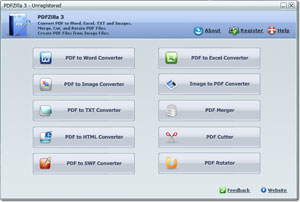
PDFZilla is a much more useful thing to have around than the legendary movie monster. With PDFZilla, users will be able to convert a PDF document into Word with only 3 mouse clicks. The program preserves the original quality of the PDF files and converts both text and images. Users can convert the entire PDF or selected pages only and event convert multiple files in the batch mode, which may come in very handy when working with large book or document archives. In addition to the Word format, PDFZilla can convert PDF files to DOC, RTF, TXT, BMP, JPG, GIF, TIF, HTML and SWF files. Finally, the program has a very simple and nice-looking interface that will take a moment or two to get used to.


Features of PDFZilla :

  • Editable - Edit Your PDF Documents In MS Word!
  • Easily - Convert PDF To Word Document Just In Only 3 Clicks.
  • High Quality - Convert PDF To Word with ALL text and Graphical Data.
  • Page Selection - Convert Selected Pages of PDF File To Word document.
  • Over 20 Languages Supported - Besides English, PDFZilla Also supports German, French, Spanish, Italian and all Unicode Language PDF Files.
  • Batch Mode - Convert More Than 10,000,000 PDF Files to Word.
  • Convert PDF to Word - Convert PDF to Word with all text and Graphical data. 
  • Convert PDF to RTF - Convert PDF to Rich Text Files. You can edit all text and graphic by Windows Wordpad. 
  • Convert PDF to TXT - Convert PDF to plain text files. You can edit text by Notepad. 
  • Convert PDF to Images - Convert PDF to BMP, JPG, GIF or TIF files. 
  • Convert PDF to HTML - Convert PDF to HTML files and automatically generate the Index file. 
  • Convert PDF to SWF - Convert PDF to Shockwave Flash Animation files which can be published on websites. 
  • Page Selection - Convert all the pages, or partial pages of PDF file. 
  • Easy to use software : Add a PDF File -> Select the Output File Format -> Click on Start Converting button, then just have a cup of coffee.


PDFZilla normally cost $29.95 but you can get it for free till Feb 5th, 2011.


To get License key Visit the Promo page, download the installation file and use the key given there to register. 

How To Edit Windows 7 Boot Menu


If you’ve ever used a dual-boot system and then removed one of the operating systems, it can still show up in Windows 7’s boot menu. We’ll show you how to get rid of old entries and speed up the boot process.
Older versions like xp editing the boot menu was an easier task compared to Windows 7. There are so many ways you can edit the boot menu of Windows 7, yet I am gonna tell you three main ways to do the task…
USING COMMAND PROMPT
We will use an application called bcdedit which is the built in application for Windows 7 boot menu edit. You should always try to use the built in applications rather using a third party one..

Type bcdedit and press enter to show the current boot menu of 7, select the identifier which you want to delete and copy it from the command prompt. After that use the following command to delete the boot menu that you have decided
bcdedit /delete <identifier>
Boot TabUSING MSCONFIG
Type msconfig in the start menu and press enter to open System Configuration Utility and select the tab Boot. From there delete the unwanted option that you need to delete.. Tick the option mark all changes permanent and press apply to save the changes to the boot menu and restart the system.
boot edit easy bcdTHIRD PARTY APPLICATIONS
There are many out there and I would prefer you to use EasyBCD application from NeoSmart Technologies. This tiny application is free of cost and easy to use with a smart user friendly interface. Go to the edit boot menu tab and delete the unwanted option and apply to save the changes.

AVG Free Edition 10.0.1170 (32-bit)

AVG Anti-Virus Free Edition is trusted antivirus and antispyware protection for Windows available to download for free. In addition, the new included LinkScanner® Active Surf-Shield checks web pages for threats at the only time that matters - when you're about to click that link.
AVG Anti-Virus Free has these following features:

  • Award-winning antivirus and antispyware
  • Real-time safe internet surfing and searching
  • Quality proven by 80 million of users
  • Easy to download, install and use
  • Protection against viruses and spyware
  • Compatible with Windows 7, Windows Vista and Windows XP
AVG Anti-Virus Free Edition is only available for single computer use for home and non commercial use.
This is the 32-bit version.

Download Harry Potter 7 Free Theme for Windows 7

All you Harry Potter fans, rejoice! Harry Potter 7 (also known as Harry Potter and the Deathly Hallows) is to be released in two parts, with the first part releasing in few days from now. It has already got some rave reviews and if you are a Harry Potter fan and a Windows 7 user, go ahead and check out this cool Harry Potter 7 theme.

“Harry Potter 7″ – Free Windows 7 theme

This theme consists of nine Harry Potter wallpapers, have a look at some of them.
harry-potter-7
free-harry-potter-7
Good enough theme to try out for few days, isn’t it?


-----------------------------------------------------------------------------------------------------------------------------------
........................................................................................................................................................................................................................................................................................................................................-----------------------------------------------------------------------------------------------------------------------------------

Download Windows Live Essentials 2011 [Offline Installer]


We will review the Windows Live Essentials 2011 soon, but you can go ahead and download the stable version right now from their website.
The Offline installer is around 155 MB in size and includes all the programs, you can chose which needs to be installed while running the installer.

Speccy 1.07.205

Speccy will give you detailed statistics on every piece of hardware in your computer. Including CPU, Motherboard, RAM, Graphics Cards, Hard Disks, Optical Drives, Audio support. Additionally Speccy adds the temperatures of your different components, so you can easily see if there's a problem!
  • Processor brand and model
  • Hard drive size and speed
  • Amount of memory (RAM)
  • Graphics card
  • Operating system
At first glance, Speccy may seem like an application for system administrators and power users. It certainly is, but Speccy can also help normal users, in everyday computing life.
If you need to add more memory to your system, for example, you can check how many memory slots your computer has and what memory's already installed. Then you can go out and buy the right type of memory to add on or replace what you've already got.

How to repair AVI video files

repair-fix-avi-filesMovie or serial files downloaded through internet might be found corrupted when you tries to play them other problems in this category might be video playback stops or freezes suddenly, distorted or disoriented pictures or images, broken or not smooth video stream, prematurely terminated or partially downloaded files, video cannot be seeked and etc.
The error in playing a video files, especially after spending hours to download ad the media, is frustrating and annoying. Re-downloading the files can take ages again, and worse if the videos are no longer available elsewhere. Here are some helpful tools which will help you to fix the files..

DivFix++
DivFix++ (or DivFixPP) enhances and improves on the DivFix, the pioneering AVI video repair utility, to fix the bugs and fasten the performance. DivFix++ started its life as CLI “DivFix” clone, and has since been given a GUI. Thus, DivFix++ also supports several CLI (command line interface) argument parameters. DivFix++ repairs broken AVI file streams by rebuilding index part of file.
Tip: “Strip Index” button removes index of AVI video files, causing the video unsearchable or unseekable (fast forward or backward), while “Check Errors” allows user to check if the files has any error prior to fixing.
Download DivFix++ v0.34 for Windows (32-bit): DivFix++_v0.34-Win32.zip
Download DivFix++ v0.34 for Windows (64-bit): DivFix++_v0.34-Win64.zip
Download DivFix++ v0.34 for Mac OS X: DivFix++_v0.34-Mac.dmg
Download DivFix++ One Click Install v0.01 for OpenSUSE, Ubuntu, Mandriva, Fedora, Debian, CentOS and RHEL LinuxDivFix++ One Click Install v0.01.ymp
DivFix
DivFix was created to be able to watch partially downloaded DivX (AVI) movies, by rebuilding or stripping the index part of the movie, which is at the end of the file. There are also a basic error detection, which can detect serious errors in the audio/video stream.
Download DivFix v1.10 for Windows: DivFix110.zip
Download DivFix v1.10 for Linux: DivFix110.tar.gz (Library Files)
DivXRepair
DivXRepair can repair corrupted AVI files and eliminate freezes. DivXRepair is based on VirtualDub, and it automatically detects and cut off or eliminates bad frames which are undecodable or freezing, then re-assemble the AVI file. Download DivXRepair v1.0.1 for Windows: DivXRepair_BIN_v1.0.1.zip
Digital Video Repair
Digital Video Repair (DVR) is a free small utility for repairing (fixing) AVI files. Features of Digital Video Repair include ability to detect the bad data, repair the index AVI file, detect the key-frame for XviD, DivX 4/5, 3ivx, Microsoft MPEG4 (versions 1, 2, 3), DivX 3.11 and late (versions 1, 2, 3 Low or Fast), Angel Potion (versions 1 or 2) codecs, and support the Standart AVI file format (Microsoft Video for Windows ) and the OpenDML AVI file format.
Download Digital Video Repair 2.2: dvrsetup.exe

Download complete websites to your desktop and surf them offline


Website eXtractor saves you time and effort by downloading entire Internet sites (or the sections you stipulate) to your hard drive. 
Whether you browse the web for research, work, or fun, there's nothing worse than having to wait for page after page to load in Internet Explorer or Netscape Navigator (or in other popular browsers). The problem is they will only load one page at a time. So if you are viewing a large website with a thousand pages, you'd have to click the mouse a thousand times ... and ... choose a directory/folder a thousands times when you want to save each file. You end up spending a lot of time waiting around and not enough time reading or viewing pages on the Internet.
Note: Using a regular browser to surf large websites or photo galleries takes the fun out of web browsing and makes research a real chore.
But now, with WebSite eXtractor, you can download whole websites (or parts of them) in one go to your computer. You can then view the whole site offline at your leisure - and you can whiz through the saved pages at lightning speed.
WebSite eXtractor is a great tool for researchers, journalists, students, equity analysts, business and marketing executives - as well as for those who want to browse family websites containing digital photo albums.
Advantages :

  • Transfer whole websites to CD-ROM or floppy
  • Another big benefit of the program is it changes html-links to relative names. In other words, it turns web addresses (URLs) into addresses that work on your computer.
  • Researchers, writers, and journalists can easily archive reference material from the Internet.
  • The program can download up to 100 files at a time, which saves you a huge amount of time compared to ordinary browsers.
  • Website eXtractor automatically lets you download any files that were not copied due to transfer errors or bad connections.

To download the full version use the given torrent :http://torrents.thepiratebay.org/3655896/Website_eXtractor_9.52_Retail.3655896.TPB.torrent

If you dont have torrent client download from here :http://www.internet-soft.com/DEMO/webextrasetup.exe

NOD32 AntiVirus 4.2.67

ESET NOD32 Antivirus is the most effective protection you can find to combat today's huge volumes of Internet and email threats. It provides comprehensive antivirus and antispyware protection without affecting your computer's performance.
Using advanced ThreatSense® technology, ESET NOD32 Antivirus proactively protects you from new attacks, even during the critical first hours when other vendors' products aren't aware the attack even exists. ESET NOD32 Antivirus detects and disables both known and unknown viruses, trojans, worms, adware, spyware, rootkits and other Internet threats.
ESET NOD32 Antivirus is also one of the fastest antivirus solutions, so fast you won't even notice it running. And it's both incredibly easy to use yet simple to tailor for your specific needs.
Key Benefits:

  • Protection from the Unknown
  • Finds Malware Other AV Companies Missed
  • Built for Speed
  • Easy on Your System
  • Easy on You

Microsoft Security Essentials


With Microsoft Security Essentials Beta, you get high-quality protection against viruses and spyware, including Trojans, worms and other malicious software. And best of all, there are no costs or annoying subscriptions to keep track of.
Security Essentials is easy to install and easy to use. Updates and upgrades are automatic, so there's no need to worry about having the latest protection. It's easy to tell if you're protected - when the Security Essentials icon is green, your status is good. It's as simple as that.
When you're busy using your PC, you don't want to be bothered by needless alerts. Security Essentials runs quietly in the background, only alerting you if there's something you need to do. And it doesn't use a lot of system resources, so it won't get in the way of your work or fun.

Get Mac OS like dock on Windows


windows-desktop-dock
If you are inspired by Mac OS and want a look like that here is our first article to transform your Windows to Mac OS. But here we will be telling you about bringing a Dock like Mac OS on your Windows running PC. There are plenty of applications available which can tweak the look of your Windows OS to add a dock with icons of applications installed on your computer.
ObjectDock is similar application which adds a dock on the desktop of Windows PC thru which you can quickly access different applications. The dock is very much customizable and you can place that dock on different locations on your desktop. Yes, it is true that the feeling will not be as good as Mac OS dock but still you will get some sort of feeling of that on Windows.
There are other software like Winstep Nexus Dock which can create and add dock on Windows PC. Whether you are running XP, Vista 32/64 bit, Windows 7 32 / 64 bit etc. you can install these applications to get a good looking dock on your computer.

Any Video Converter 3.11


Any Video Converter is an All-in-One video converting tool with easy-to-use graphical interface, fast converting speed and excellent video quality. It allows you to effortlessly convert video files between every format! It can convert almost all video formats including DivX, XviD, MOV, rm, rmvb, MPEG, VOB, DVD, WMV, AVI to MPEG-4 movie format for iPod/PSP or other portable video device, MP4 player or smart phone. It also supports any user defined video file formats as the output. Any Video Converter makes it easy for anyone to enjoy the any format video with your iPod, PSP, mobile phone or MP4 player.
  • User-friendly interface that is easy to use.
  • Converts all video formats to Apple iPod Video, Sony PSP and more
  • Batch convert any video formats including avi, wmv, asf, mpg, mp4, etc.
  • Support DivX and Xvid avi format as importing and exporting video
  • Support default video/audio settings or user customized parameters for video and audio.
  • Has the option to preview the video in real-time before conversion .
  • World's fastest video conversion speed with stunning video and audio quality.
  • Supports adjust many video/audio options for MP4 files. For example, video/audio sample rate, bit rate, video size...
        

Firefox 4.0 Beta 7


The Web is all about innovation, and Firefox sets the pace with dozens of new features to deliver a faster, more secure and customizable Web browsing experience for all.

User Experience. The enhancements to Firefox provide the best possible browsing experience on the Web. The new Firefox smart location bar, affectionately known as the "Awesome Bar," learns as people use it, adapting to user preferences and offering better fitting matches over time.

Performance. Firefox is built on top of the powerful new Gecko platform, resulting in a safer, easier to use and more personal product.

Security. Firefox raises the bar for security. The new malware and phishing protection helps protect from viruses, worms, Trojans and spyware to keep people safe on the Web.

Customization. Everyone uses the Web differently, and Firefox lets users customize their browser with more than 5,000 add-ons.

FileZilla 3.3.5 RC1

Image


FileZilla Client is a fast and reliable cross-platform FTP, FTPS and SFTP client with lots of useful features and an intuitive graphical user interface.
Among others, the features of FileZilla include the following:
  • Easy to use
  • Supports FTP, FTP over SSL/TLS (FTPS) and SSH File Transfer Protocol (SFTP)
  • IPv6 support
  • Available in many languages
  • Supports resume and transfer of large files greater than 4GB
  • Powerful Site Manager and transfer queue
  • Bookmarks
  • Drag & drop support
  • Configurable transfer speed limits
  • Filename filters
  • Network configuration wizard
  • Remote file editing
  • Keep-alive
  • HTTP/1.1, SOCKS5 and FTP-Proxy support
  • Logging to file

Eraser 6.0.8.2273

Eraser is an advanced security tool for Windows which allows you to completely remove sensitive data from your hard drive by overwriting it several times with carefully selected patterns.
When you delete a file, the operating system does not really remove the file from the disk; it only removes the reference of the file from the file system table. The file remains on the disk until another file is created over it, and even after that, it might be possible to recover data by studying the magnetic fields on the disk platter surface.
There are several problems in secure file removal, mostly caused by the use of write cache, construction of the hard disk and the use of data encoding. These problems have been taken into consideration when Eraser was designed, and because of this intuitive design and a simple user interface, you can safely and easily erase private data from your hard drive.

Download Windows 8 Transformation Pack ( THEME )

Earlier I have introduced the Windows 7 Transformation pack along with several other Transformation packs. But this time I am introducing Windows 8 Transformation pack. As you all know Windows 8 OS has not been created yet, but a DeviantART user Mufflerexoz has created Windows 8 Transformation pack on its own imagination.
Windows 8 Transformation Pack will provides lots of new features along with a newly designed interface. It looks very similar to Windows Vista and Windows 7 but there are many GUI changes like redesigned taskbar, Explorer, new boot screen and login screen, etc. Below I am adding some screenshots of Windows 8 Transformation pack, take a look:
windows 8 superbar 300x187 Download Windows 8 Transformation Pack
You can use Windows 8 Transformation Pack on Windows Vista. Download windows 8 transformation pack from following link:

Microsoft Office 2010 Price details


Microsoft Office 2010 Prices
Here are the pricing details of Microsoft Office 2010 (MS Office 2010 Price) :
  • Microsoft Office 2010 Home and Student Price – $149 as a boxed product, and for $119 with a product key card
  • Microsoft Office 2010 Home and Busines Price- $279 as a boxed product, and $199 with a product key card
  • Microsoft Office 2010 Professional Price – $499 as a boxed product, and $349 with a product key card
  • Microsoft Office 2010 Professional Academic version Price – $99 as a boxed product
In Simple Words:
  • For people running a small business or working from home, MS Office Home and Business is offered for $279 (boxed) or $199 (Product Key Card) and includes Word 2010, Excel 2010, PowerPoint 2010, OneNote 2010, Outlook 2010, and Office Web Apps.
  • For more advanced needs,MS Office Professional is offered for $499 (boxed), or $349 (Product Key Card) and includes Word 2010, Excel 2010, PowerPoint 2010, OneNote 2010, Outlook 2010, Publisher 2010, Access 2010, premium technical support, and Office Web Apps.

uTorrent 2.0.4 Build 22967


µTorrent is a small and incredibly popular BitTorrent client.


Micro-Sized Yet Feature Filled
Most of the features present in other BitTorrent clients are present in µTorrent, including bandwidth prioritization, scheduling, RSS auto-downloading and Mainline DHT (compatible with BitComet). Additionally, µTorrent supports the Protocol Encryption joint specification (compatible with Azureus 2.4.0.0 and above, BitComet 0.63 and above) and peer exchange.

Resource-Friendly
µTorrent was written with efficiency in mind. Unlike many torrent clients, it does not hog valuable system resources - typically using less than 6MB of memory, allowing you to use the computer as if it weren't there at all. Additionally, the program itself is contained within a single executable less than 220 KB in size.

Skinnable and Localized
Various icon, toolbar graphic and status icon replacements are available, and creating your own is very simple. µTorrent also has support for localization, and with a language file present, will automatically switch to your system language. If your language isn't available, you can easily add your own, or edit other existing translations to improve them!

Actively Developed and Improved
The developer puts in a lot of time working on features and making things more user-friendly. Releases only come out when they're ready, with no schedule pressures, so the few bugs that appear are quickly addressed and fixed.

CCleaner 3.00.1310 New!


CCleaner is a freeware system optimization, privacy and cleaning tool. It removes unused files from your system - allowing Windows to run faster and freeing up valuable hard disk space. It also cleans traces of your online activities such as your Internet history. Additionally it contains a fully featured registry cleaner. But the best part is that it's fast (normally taking less than a second to run) and contains NO Spyware or Adware! :)
Cleans the following:
  • Internet Explorer
  • Firefox
  • Google Chrome
  • Opera
  • Safari
  • Windows - Recycle Bin, Recent Documents, Temporary files and Log files.
  • Registry cleaner
  • Third-party applications
  • 100% Spyware FREE

Google Chrome 9.0.570.0 Beta


Google Chrome is a browser that combines a minimal design with sophisticated technology to make the web faster, safer, and easier.
One box for everything
Type in the address bar and get suggestions for both search and web pages.
Thumbnails of your top sites
Access your favorite pages instantly with lightning speed from any new tab.
Incognito mode
Don't want pages you visit to show up in your web history? Choose incognito mode for private browsing.
Safe browsing
Google Chrome warns you if you're about to visit a suspected phishing, malware or otherwise unsafe website.
For information about alpha and developer builds, check out the Chrome dev channel here.